Features

Everything Track & Bill does today

No roadmap items on this page. Everything below is live in the product right now, from the time entry screen through to a paid invoice.

Track

Hours, drives and expenses — logged where the work happens

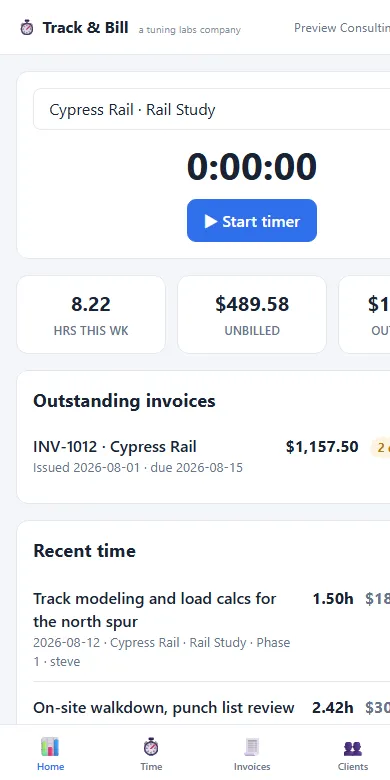
The Track & Bill dashboard: a running timer card, hours this week, unbilled value, and outstanding invoices.
The dashboard: timer on top, the week's numbers right under it.

Dashboard and timer

  • One tap starts the timer against a client and job; stop it and the entry is logged with the duration filled in.
  • The dashboard shows the week at a glance: hours this week, unbilled value, and outstanding invoices — so you always know what is earned but not yet billed.
  • Recent time sits right under the timer for quick edits.
Time entries

  • Log time against a client, then a job, then a sub-job, then a task. Every entry takes a note.
  • Entry screens are built phone-first for field use: compact rows, no horizontal scrolling, usable one-handed.
  • In a team account every entry records who logged it, and shows that person’s name once the team has more than one member.

Mileage

  • Log drives manually against a client or a job, or tap Start drive / End drive to capture a trip’s distance from your phone’s GPS — the coordinates stay on your device and only the mileage is saved.
  • Mileage bills as a single aggregated line on the invoice, at the rate configured in your settings — change the rate in one place and it applies everywhere.

Expenses

  • Log expenses against a client or job.
  • They flow onto the invoice as their own line items, alongside the time and the mileage.

Clients and jobs

  • A client directory with per-client rates and details.
  • Jobs and sub-jobs under each client, with time, mileage and expenses rolling up under them.

Invoice

The part most time trackers hand back to you

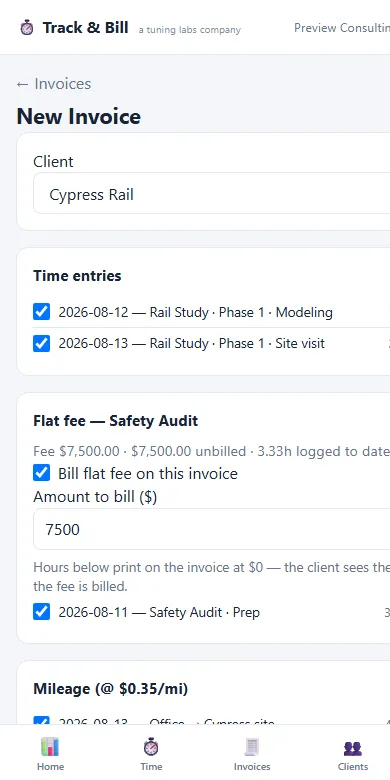
The Track & Bill invoice wizard with unbilled time entries pre-checked, a flat-fee engagement card, and aggregated mileage.
Pick a client; the unbilled work is already checked — including flat-fee and mileage.

The invoice wizard

  • Pick a client and every unbilled time entry, drive and expense appears pre-checked. Uncheck anything to hold it for later.
  • Invoices itemize the work exactly: one line per time entry — "Aug 1, 2026 — Job — sub-job — task" — with the note on the detail line, one aggregated mileage line, and expense lines.
  • Sequential invoice numbering with a prefix you configure, and collision protection so two invoices can never claim the same number.
  • Invoice dates fill in automatically from today plus your payment terms, and stay adjustable per invoice. Tax percentage is set per invoice.

Full lifecycle

  • Draft to Sent to Paid, plus Void and Reopen.
  • Deleting a draft or voiding an invoice releases its line items back to unbilled — work is never lost, just un-billed.

Purchase orders

  • Attach an invoice to a client PO at creation time, from a dropdown of open POs or as free text.
  • Apply or change the PO after the fact, on a draft, a sent invoice, or even a paid one.
  • A live over-budget warning appears in the wizard when an invoice would exceed the PO’s remaining balance.
  • When an invoice uses up a PO, the app prompts you to close it and open the replacement in one step.

Retainers

  • Record a client retainer deposit and generate a proper deposit invoice for it.
  • At invoicing time, a one-click "Apply retainer credit — $X available" checkbox draws the retainer down against the bill.
  • A full retainer ledger per client. Credits release automatically if an invoice is deleted or voided, and deposit reversals are guarded so an already-drawn deposit cannot be un-paid.

Flat-fee engagements

  • Mark any job as flat-fee with a set amount. Logged hours still count — they print on the invoice at $0 as "(included in flat fee)" so the client sees the work behind the number.
  • The wizard shows a per-engagement card with the unbilled remainder pre-filled, and asks before you bill past the agreed fee.
  • Burn-down — billed versus remaining — shows on the job so you spot an engagement going over before it happens.

Get paid

A payment link and a document that looks the part

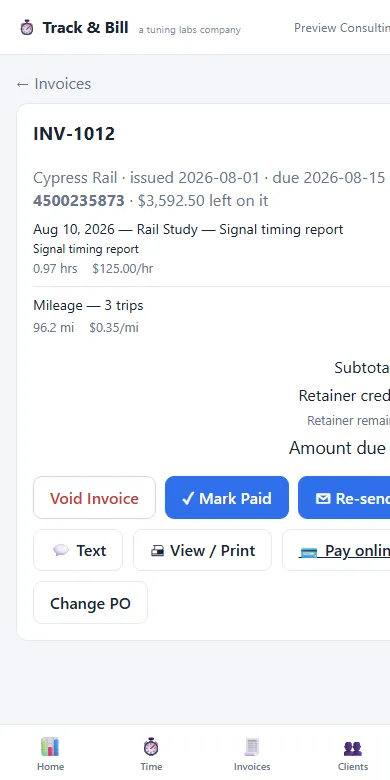
A printed Track & Bill invoice with company header, bill-to block and itemized lines.
The printed invoice, straight from the browser.

Pay online

  • Every unpaid invoice carries a Pay online button linked to your company’s Stripe payment link, and the link is printed in the invoice’s payment instructions too.
  • Each company connects its own Stripe account. Track & Bill never touches the money.

Print and PDF

  • Every invoice renders as a clean, professional document: company header with your full business details, BILL TO and DETAILS blocks, the itemized table and retainer totals.
  • Paid and void invoices print with a matching watermark.
  • Save as PDF from any browser — nothing extra to install.

Send it without leaving the app

  • Email an invoice to the client with the PDF attached, from the invoice screen — the draft flips to Sent automatically, and re-sends are one tap.
  • Text it instead: a login-free, branded link to the invoice opens your phone’s SMS composer with the message ready to go.
  • Void a sent invoice and the client gets a proper void notice so nobody pays a dead bill.

Aging at a glance

  • Overdue invoices show an aging pill — how many days past due — right on the invoice list, replacing the plain status badge the moment a bill goes late.
  • Follow-up gets scheduled around facts, not memory.

Service visits

Lawn care and house cleaning: arrive, work, leave — the invoice sends itself

Service schedules

  • Set each customer’s service, how often, the next date, and how you bill it: a flat fee per visit or by time on site.
  • Customers get a day-before reminder email automatically; you get a “tomorrow’s visits” digest.

Arrived / Left with GPS

  • Tap Arrived on site and the customer gets an email with the time and a GPS check-in. Location is read only at the tap, and the notice still sends if you decline.
  • Tap Left and the invoice is created for the agreed fee — or the hours you were there, to the quarter hour — and emailed to the customer with the next scheduled visit on it. The schedule rolls forward on its own.

Data

Move in easily, get out just as easily

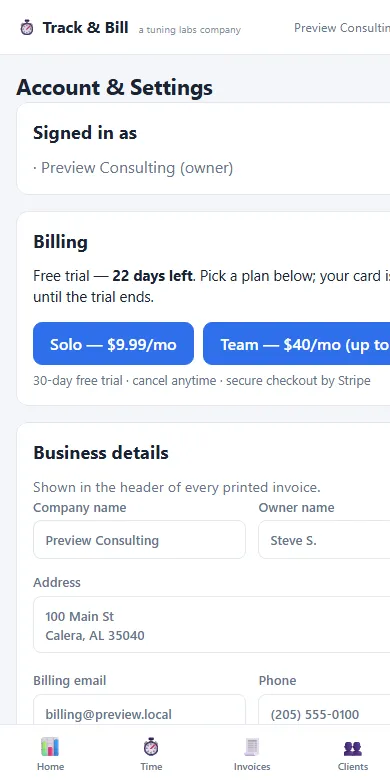
The Track & Bill More screen with import, export, backup, business details and billing cards.
Import, export, backup and billing — all on one screen.

CSV import

  • Bring your history from Toggl (detailed export), Harvest, or any generic CSV — the importer auto-detects the format and maps the columns.
  • Missing clients and jobs are created on the fly, so an import never fails on setup you have not done yet.

Accounting exports

  • QuickBooks Online invoice CSV, formatted against Intuit’s import spec — one row per line item, sent and paid invoices, tax as its own line.
  • A generic invoice CSV with every status and the retainer math, plus a clients CSV.
  • One-click full backup of company data, including the retainer ledger. Your data is never held hostage.

Teams

Two roles, real isolation, no IT project

Owners and members

  • Owners manage the team, clients, rates and money operations. Members log their own time in the field.
  • An owner adds team members by email from the Team card — there is nothing to configure first.

Multi-company

  • Each company’s data is fully isolated. Company A can never see Company B’s data — enforced at the database level with row-level security, not just hidden in the interface.
  • Anyone who belongs to more than one company gets a company switcher, and new users get a guided "Set up your consulting company" flow on first login.
  • A business details card — name, owner, address, email, phone, website — feeds straight into the printed invoice header.

Your data

  • One-click backup export of all company data, including the retainer ledger.
  • In-app account deletion with typed confirmation. Your memberships and login are removed; company data is preserved for any remaining owners, and a sole owner with an active team is protected from orphaning it by accident.
  • Password reset by email, with authentication handled by Supabase Auth.

One more thing on every invoice

Invoices you send carry a small footer line — “Invoice your clients with Track & Bill →”. It is on by default and you can switch it off in settings whenever you want.

Set up for your work

The same features, in your language

At signup you pick a platform, and the app comes set up for it —consulting (Clients, POs, retainers, mileage),babysitting & pet sitting (Families, e-signed rate agreements, rates per hour, visit or night), lawn care (Customers, a service schedule, and one-tap flat-fee billing), or house cleaning (Clients, GPS-stamped arrival and departure notices, and one-tap flat-fee billing).

See it with your own clients

Set up a company, log an hour, and generate an invoice. Seven days on monthly plans, 30 when you prepay a year — card required, not charged until the trial ends.

Up to 30 days free — 7 days on monthly plans, 30 when you prepay a year. Card required, you won't be charged until the trial ends · cancel anytime